So the BW team raised an issue where a table could not be activated after they added an attribute to it.
Important tools to check tables included transactions SE16 ,SE14 , SE11
But turns out the problem was with the temporary tablespace , no more data files could be added so this was done using BRTOOLS to extend the tablespace.

What is SAP ERP? SAP stands for Systems, Applications, and Products.ERP is an abbreviation of Enterprise Resource Planning. ERP helps an organization run its business effectively by planning its resources efficiently. SAP BASIS is the technical foundation of SAP systems and includes installation, configuration and system administration of the platform.In this blog i share solutions to common problems encountered as a SAP certified technical consultant number S0011755107
Friday, September 2, 2016

Thursday, August 11, 2016
STMS issues after a system refresh
So the other weekend we carried out a system refresh of the QAS system with Production.
Apart from the standard reconfiguration of RFC's , re-importing of transport request and other post refresh activities we encountered an issue where users could not release transports to test using Solution Manager , and also in transaction STMS queues users were being prompted for a username and password when trying to refresh the transport queue.
After alot of checking on and resetting the TMSADMIN password due to user failed log in errors, RFC generation and all we discovered it is easier to recreate the whole transport management system from scratch and redistributing the setting from the domain controller.
This saves you time from groping around trying to pin point the problem!
Apart from the standard reconfiguration of RFC's , re-importing of transport request and other post refresh activities we encountered an issue where users could not release transports to test using Solution Manager , and also in transaction STMS queues users were being prompted for a username and password when trying to refresh the transport queue.
After alot of checking on and resetting the TMSADMIN password due to user failed log in errors, RFC generation and all we discovered it is easier to recreate the whole transport management system from scratch and redistributing the setting from the domain controller.
This saves you time from groping around trying to pin point the problem!
Tuesday, August 9, 2016
Locked objects in transport request
While doing an upgrade of our ST/PI component (service tools for applications 0 from SP09 to the new SP13 using SPAM i encountered and error that some objects were locked in a transport request.
The issue is the owner of the request was a Solman Admin user in a different client and i could not release the transport request because it was for implementation of a SAP note and its status was inconsistent !
However i managed to log in to client 001 and using transaction SE03 I was able to unlock the objects in that transport.
Very powerful tool SE03 but be very careful what you use it for as you could cause major system inconsistencies !!!
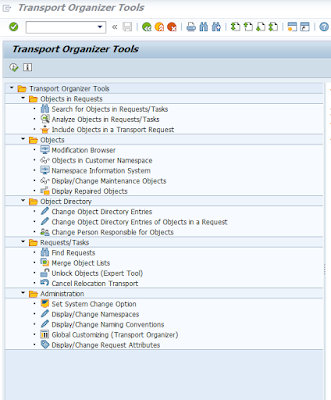
The issue is the owner of the request was a Solman Admin user in a different client and i could not release the transport request because it was for implementation of a SAP note and its status was inconsistent !
However i managed to log in to client 001 and using transaction SE03 I was able to unlock the objects in that transport.
Very powerful tool SE03 but be very careful what you use it for as you could cause major system inconsistencies !!!

Monday, August 8, 2016
A QUESTION !!!
Today I am seeking some information..Does anyone know what it takes to switch from extended classic SRM deployment scenario to classic scenario?
Friday, June 17, 2016
Controlling global settings of a Web dynpro
To check and modify settings of a web dynpro use transaction SICF and select service WD_GLODAL_SETTING.
Right click on the service and here you find options you can change and set as per your need.

We had an issue where the the technical information was visible to users if they right clicked on a the webdynpro links but this was resolved by removing the S_DEVELOP authorization from the user running the services in SICF.
Right click on the service and here you find options you can change and set as per your need.

We had an issue where the the technical information was visible to users if they right clicked on a the webdynpro links but this was resolved by removing the S_DEVELOP authorization from the user running the services in SICF.
Wednesday, June 15, 2016
Interesting transactions
So in the course of this week I worked on two interesting transactions. One is to activate smart forms ( e.g in the New HR Renewal 1.0/2.0 for manager/employee self services)
The transaction name is smartforms and you have to Step one Verify form + Step 2 Activate function module


The transaction name is smartforms and you have to Step one Verify form + Step 2 Activate function module

the other transaction is SMMS for message server monitoring

Tuesday, May 31, 2016
Configuring centralized monitoring in SOLMAN 71.

Today faced issues as i try to configure SOLMAN centralized system monitoring.
I am getting no CCMSPING ...headache!!! important transactions im using include RZ21, RZ20 , LMDB ,checking SAPOSCOL ,at OS level and settings in the SOLMAN_WORKCENTER
Ongoing work stay tuned!......
Subscribe to:
Posts (Atom)