So while importing an OCS package using SPAM the process gets stuck in the TP connected state.
I have seen many suggestions online including to run report RDDNEWPP in SE38 and deleting any entries in table TRBAT using se30
My own solution was to check in /usr/sap/trans/log for information of the error. Which was indicating that a certain file in /usr/sap/trans/tmp was already in use!
So in /usr/sap/trans/tmp check for the file indicated in the logs and rename it then retry...!!!

What is SAP ERP? SAP stands for Systems, Applications, and Products.ERP is an abbreviation of Enterprise Resource Planning. ERP helps an organization run its business effectively by planning its resources efficiently. SAP BASIS is the technical foundation of SAP systems and includes installation, configuration and system administration of the platform.In this blog i share solutions to common problems encountered as a SAP certified technical consultant number S0011755107
Thursday, December 1, 2016

Friday, November 25, 2016
Virus scan profiles
Useful transactions for managing virus scan profiles are:
/IWFND/VIRUS_SCAN
and
VSCAN
I am still working on this issue and will give an update ASAP.
/IWFND/VIRUS_SCAN
and
VSCAN
I am still working on this issue and will give an update ASAP.
/usr/sap/trans FULL!!!!!
So the other day I was importing some new support packages using SPAM and the status was not changing. Checking the logs it seems nothing was happening
On checking /usr/sap/trans i realised the file system was 100% used!
Useful tp commands while in the /usr/sap/trans/bin directory
tp check all pf=<transport_profile>
tp clearold all pf=<transport_profile>
On checking /usr/sap/trans i realised the file system was 100% used!
Useful tp commands while in the /usr/sap/trans/bin directory
tp check all pf=<transport_profile>
tp clearold all pf=<transport_profile>
Wednesday, November 2, 2016
Issue in MOPZ (maintenance optimizer)
When creating a new planned maintenance in SOLMAN using MOPZ , the solution is displayed but there is no product version in the dropdown.
This can be solved by migrating the product using transaction LMDB since it is no longer done using SMSY.
This can be solved by migrating the product using transaction LMDB since it is no longer done using SMSY.
Friday, September 2, 2016
BW issues with activation of a table after adding an attribute
So the BW team raised an issue where a table could not be activated after they added an attribute to it.
Important tools to check tables included transactions SE16 ,SE14 , SE11
But turns out the problem was with the temporary tablespace , no more data files could be added so this was done using BRTOOLS to extend the tablespace.
Important tools to check tables included transactions SE16 ,SE14 , SE11
But turns out the problem was with the temporary tablespace , no more data files could be added so this was done using BRTOOLS to extend the tablespace.
Thursday, August 11, 2016
STMS issues after a system refresh
So the other weekend we carried out a system refresh of the QAS system with Production.
Apart from the standard reconfiguration of RFC's , re-importing of transport request and other post refresh activities we encountered an issue where users could not release transports to test using Solution Manager , and also in transaction STMS queues users were being prompted for a username and password when trying to refresh the transport queue.
After alot of checking on and resetting the TMSADMIN password due to user failed log in errors, RFC generation and all we discovered it is easier to recreate the whole transport management system from scratch and redistributing the setting from the domain controller.
This saves you time from groping around trying to pin point the problem!
Apart from the standard reconfiguration of RFC's , re-importing of transport request and other post refresh activities we encountered an issue where users could not release transports to test using Solution Manager , and also in transaction STMS queues users were being prompted for a username and password when trying to refresh the transport queue.
After alot of checking on and resetting the TMSADMIN password due to user failed log in errors, RFC generation and all we discovered it is easier to recreate the whole transport management system from scratch and redistributing the setting from the domain controller.
This saves you time from groping around trying to pin point the problem!
Tuesday, August 9, 2016
Locked objects in transport request
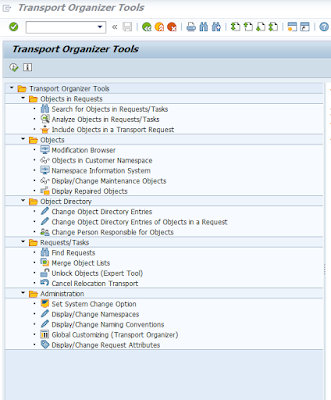
While doing an upgrade of our ST/PI component (service tools for applications 0 from SP09 to the new SP13 using SPAM i encountered and error that some objects were locked in a transport request.
The issue is the owner of the request was a Solman Admin user in a different client and i could not release the transport request because it was for implementation of a SAP note and its status was inconsistent !
However i managed to log in to client 001 and using transaction SE03 I was able to unlock the objects in that transport.
Very powerful tool SE03 but be very careful what you use it for as you could cause major system inconsistencies !!!
The issue is the owner of the request was a Solman Admin user in a different client and i could not release the transport request because it was for implementation of a SAP note and its status was inconsistent !
However i managed to log in to client 001 and using transaction SE03 I was able to unlock the objects in that transport.
Very powerful tool SE03 but be very careful what you use it for as you could cause major system inconsistencies !!!

Subscribe to:
Posts (Atom)